I think both of these are of interest and worth thinking about. I like their simplicity and the running possibilities of both of them.


I'm going to have to put this new beast somewhere in our tiny home. I want it to be interesting to build, program for, run and to look at. After a lot of thinking and discussion we've decided (we) to make it portable and to let it reside mostly just outside the laundry under the dining room.
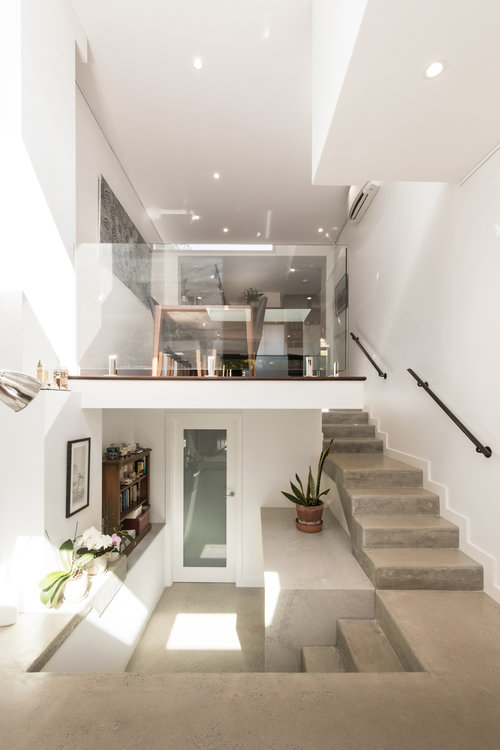
The marble benchtop with the pot-plant on it will be the nominal target area. I'll be making a 1400 x 700mm n-scale layout.
I've started a Pinterest board for ideas and I've already done a few draft layouts using AnyRail.
Ideas welcome!
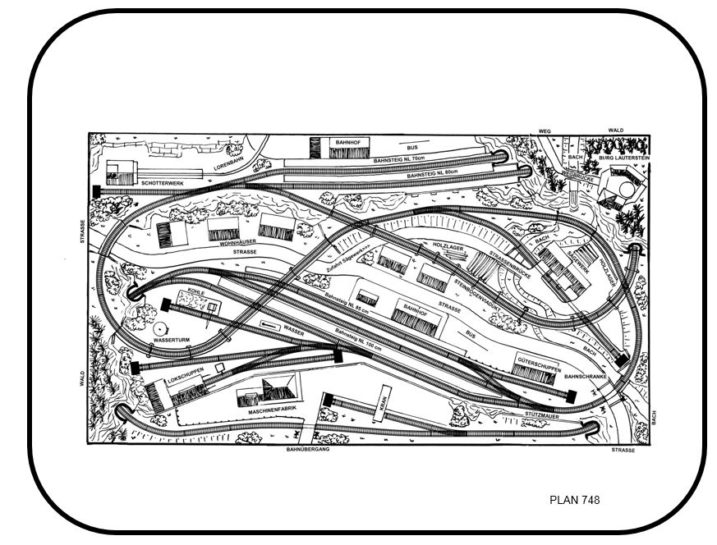
So far this one is a favourite:
It's been 3 years - what happened? Well, life happened, I guess. We had a lovely house with a basement room and my model railway was well under way down there.
Our kids finished school, started University at Sydney Uni (which is inner city) and we thought, "let's move to the inner city so we can be with them"! As you can imagine, living in one of the most expensive cities on Earth means an inner city house costs a fearsome fortune - unless you buy a dump and renovate.
So, now I've finished renovating :-) and we've moved in and settled into our new life. It only took 2 years to build and one to settle in. I've filled my hobby time with pottery and leather-craft and finally my trains are out of storage and I'm returning to them. So, stay tuned.
You may recall that I've been planning to make a small Dr. Who scene on the model railway involving Daleks.
So now I've got a large Dalek Death Squad ready for my model trains. You may remember this old post about our first shot at 3D printing small Daleks. Well things have moved on a lot since then!
Franc's mastered his 3D printing skills and found a way to make finer steps in the printing process to make an new and improved set of Daleks for me. I've been straining my eyes and using a binocular head mounted magnifier to paint them. Yes, it all sounds a bit freakish but the results are awesome.
Here's the raw material from Franc:
I then mount the individual units on the handle of a small hammer using blu-tack to paint them.
And here they are with the Tardis on my old MacBook.
I've finally completed (most of) the roadway on which the tram now runs. I have had to very tightly fit my home-made cobblestone paper to the tracks. You may recall that I had built up the roadway around the tracks using cork strips. I've now covered those with carefully cut paper.
The main issue was cutting to fit the curves. There's no way this can be done easily by hand. What to do?
Well, modern technology (and Franc Carter) to the rescue. I asked Franc to laser cut some guides to cut out the road surface curves. He kindly cut them to my spec out of MDF and I've used them to cut out curved sections from the cobblestone paper.
I reckon it looks excellent. Better than commercial tramway stuff! It fits really well and I reckon eooks pretty good even up close.
I've added a few photos of the tram in front of some buildings just to show how the bprinted cobblestone paper looks with the tram on it and some buildings in the background.
I reckon it looks super!
The model railway is a complex layout in some ways and has a lof of tunnels running at many levels. It's also got the town sitting alongside the tram track. I've made a big effort to line all tunnels with heavy black card and I've done a light paintjob in areas inside the tunnels along the trackwork in a wash of black to get things looking more like a real railway. I have yet to ballast and will be doing light ballasting in more exposed areas "underground" and heavy ballasting everywhere else.
I've also fully levelled the area under the buldings in the town using the same thick black card.
All the tram track has been "filled" with plasticine to make it look more road like. I'll be using cobblestone paper to make the current cork look more road like at each side of the track. More on that later.
All of this has left me in a position to begin more serious landscaping. In order to dip my toe into the water in a small way I've started building the slope up to the left of the main station. In order to complete this area I've had to construct a triple track tunnel portal. I did this simply using brink paper (see here) covering a carefully cut out piece of polystyrene. I added details by covering balsa strips with brick paper and gluing it on. The tunnel arch was reinforced with individually cut out strips of card one bring high which I've arched over the mouth of the tunnel.
I'm readying myself to make a bunch of stuff for the landscaping and I realised that I need decent stone surfaces for roads etc.
Buying this stuff readily in Sydney is pretty hard and when you do find it, it's quite expensive. Why not use by Canon bubblejet and some matte photo paper and just print exactly what I want?
Google to the rescue...
I did a few searches on Google for Cobblestones and so forth on the Images section and found these:
I then used them as textures to fill rectangles in MS PowerPoint and produced this sort of result (PDF).
I have to apologise to everyone who has formerly read thsi blog - it's been about 12 months since I posted. Oh dear!
All I can say is that I got a bit distracted! We renovated the house and had to move out for part of that period, I also designed and built a prototype garden computer which worked, as it turned out but also died due to lack of attention during the renovation.
So now, I'm making up for lost time.
I've made leaps and bounds with the software for the system. It runs very well but the limit has to be 2 trains otherwise it dead-locks eventually with all trains waiting for the others to move. A veritable Mexican stand-off. Furthermore, Andrew Joyner proved that 2 trains was the theoretical limit using some nice maths. Thanks Andrew, if you're reading this. Do you want to post your article?
Still, I've vowed to stop working on the software and start landscaping. New blog entries will flow this afternoon.
I've finally wired in the Arduino Mega 2560, the Pololu servo controller, a relay board to control the track blocks and the L298 motor system to drive the trains and the tram.
It's all nicely tucked away under the layout and finally all trackwork is in place and a demo program is running which allows the train to run on every track section, exercise all the points etc.
I'll post more still shots later but for now, here's a video...
Next will have to be the 'real' software which allows for 3 engines to run on the layout at once.
So all that hard work tinning up wires, fixing on binding posts and cable-shrink worked nicely. I've ended up with a well wired and neat central section to the railway that should prove reliable.
I've included photos below. Sensors, points and track are all wired in and bundled separately.
If you want to see the fun bit first then here's a video:
I've been working away quietly these last few weekends. Doing a lot of soldering and hacking about to get the basic control systems wired into place prior to fixing the electronics in and doing the basic wiring on the rest of the layout.
I've focused a lot recently on the wiring of the core part of the layout around the station. This part has to be done first because it's where all the electronics are and has the denses wiring so I want to get that done over at my workbench as a unit and carry it all across to the layout and plonk it in. Unfortunately it means a lot (LOTS) of soldering and tinning wires nicely.
You can see all the wires I've prepared to solder to the rails for power. One end raw and tinned up to attach to teh track, the other end with a nice post soldered on with some heat-shrink to plug the wire into a socket for eventual connection back to the controllers.
An example of how it connects to the rails below...
And now for the tram. Basically, the track is in place and is wired up including the sensors. You can see them in the photos below.
And here's the whole track...
And now for the movie...The system is fully automated and run by Arduino. It's a basic program that pauses the tram at each station (ends of the line) for about 10 seconds.
I think I'd like to be able to identify which train is which on my layout without having to type in numbers and so forth. I've decided to put a single RFID reader on the track somewhere and run all trains past it at the start of my sessions so the computers can work out what is where automagically.
I bought these nifty and tiny RFID tags from LittleBird.
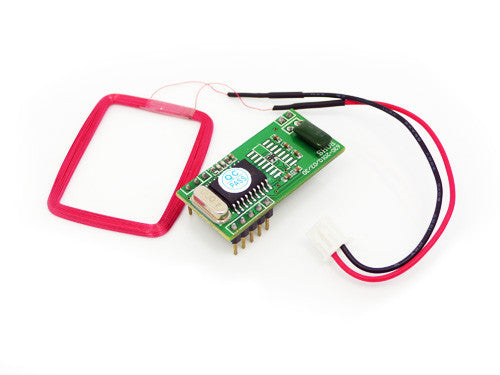
And this RFID reader with a nice TTL UART for serial transmission.
Here's the extremely simple test circuit I built using an Arduino Nano to control it all...
The antenna is the red wiring loop on the top right. The Arduino is the blue board bottom left.
Sample code is below.
//
// This code implements a state machine to read a serial stream from pin 3
// for s simple 125KHz RFID reader:
// http://www.seeedstudio.com/wiki/index.php?title=125Khz_RFID_module_-_UART
//
//
//
#include <SoftwareSerial.h>
typedef enum RFIDProtStateType { initialising,
waiting_good,
waiting_error,
started,
reading_digits,
reading_cksum,
waiting_finish,
finished };
// a global representing the current command state
RFIDProtStateType RFIDProtState;
boolean GotRFID;
char RFIDTag[10];
char Checksum[2];
int index;
#define RFIDProtRxPin 3
#define RFIDProtTxPin 2
SoftwareSerial RFIDProtSerial = SoftwareSerial(RFIDProtRxPin, RFIDProtTxPin);
void
setup()
{
Serial.begin(9600);
RFIDProtSerial.begin(9600);
index = 0;
RFIDProtState = waiting_good;
GotRFID = false;
}
//
// Convert a string containing 2 bytes representing a number in HEX into a hex byte
// ...so a string containin "A1" will be returned as 0xA1
//
byte
StringHexToByte(char *in)
{
byte result;
int j;
result = 0;
for(j = 0; j < 2 ; j ++)
{
if( in[j] >= 'A')
{
result |= (in[j] - 'A' + 10) << 4*(1-j);
}
else
{
result |= (in[j] - '0') << 4*(1-j);
}
}
return result;
}
//
//
// Handle Char will process a message coming in of the form:
//
// <0x02><10 hex digit ID tag><2 digit xor checksum><0x03>
//
// errors show up on pin 13 (with LED)
//
void
HandleCharacter(char c)
{
int i,j;
byte cksum = 0x00;
byte digit;
switch(RFIDProtState)
{
case waiting_error:
case waiting_good:
if(c == 0x02)
{
// we now have the start character
RFIDProtState = started;
index = 0;
}
else
{
RFIDProtState = waiting_error;
}
break;
case started:
case reading_digits:
if(c >= '0')
{
RFIDProtState = reading_digits;
RFIDTag[index++] = c;
if(index == 10)
{
RFIDProtState = reading_cksum;
index = 0;
}
}
else
{
RFIDProtState = waiting_error;
}
break;
case reading_cksum:
Checksum[index++] = c;
if( index == 2)
{
// we now have the 2 bytes of checksum read in
index = 0;
cksum = 0;
// calculate the checksum from the string of digits
for(i=0; i< 5;i++)
{
digit = StringHexToByte(&RFIDTag[i*2]);
cksum ^= digit;
}
if (cksum != StringHexToByte(Checksum))
RFIDProtState = waiting_error;
else
RFIDProtState = waiting_finish;
}
break;
case waiting_finish:
if(c == 0x03)
{
RFIDProtState = finished;
}
else
{
RFIDProtState = waiting_error;
index = 0;
}
//break;
// Note no break here - fall through and handle finishing
case finished:
index = 0;
GotRFID = true;
RFIDProtState = waiting_good;
break;
}
}
void
GetCommand()
{
char c;
if(RFIDProtSerial.available())
{
c = RFIDProtSerial.read();
HandleCharacter(c);
}
if (RFIDProtState == waiting_error)
digitalWrite(13, HIGH);
else
digitalWrite(13, LOW);
}
void
loop()
{
GetCommand();
if(GotRFID)
{
int i;
for(i = 0; i < 10; i++)
Serial.print(RFIDTag[i]);
Serial.println();
GotRFID = false;
}
}
I've finished version 1 of the software to control the points. All you need to drive the system now is a single wire driving RS232 at TTL levels. It can even be driven by a simple terminal program. The command is in the form:
S00000000F
Where a 0 => set the point to straight and a 1 => set the point to turn.
The software runs a really nice little state machine to ensure robust communications. I may want to put an ACK on the serial line potentially (taking it to 2 lines to control the system.
You can see the setup in this video:
The code is below (needs comments!).
//
// Points controller using Pololu serial servo controller
// Chris Mendes 2013
//
//
// Software Serial from Arduino example by Tom Igoe
//
// Pololu code borrowed from Mike Crist...
// put() (now position_absolute) & set_speed() functions found on pololu forums & modified
// mike crist 2009-01-03
#include <SoftwareSerial.h>
#define ServoRxPin 2
#define ServoTxPin 3
#define ServoResetPin 4
// Pins for the command port
#define CmdRxPin 5
#define CmdTxPin 6
#define DebugModePin 12
typedef enum CmdStateType {initialising, waiting_good, waiting_error, started, reading_digits, waiting_finish, finished };
CmdStateType CmdState;
#define NUM_POINTS 8
byte PointAngles[NUM_POINTS][2] = { {88,94}, {86,94}, {94,86}, {85,94}, {97, 85}, {109, 96}, {93, 74}, {97, 79}};
byte NextCommand[NUM_POINTS];
byte Command[NUM_POINTS];
byte LastCommand[NUM_POINTS];
byte CmdBit;
boolean GotCommand;
int big_loop;
#define LOOP_RESET 100000
// set up a new serial port
SoftwareSerial softSerial = SoftwareSerial(ServoRxPin, ServoTxPin);
// Set Up the Command Port
SoftwareSerial CmdSerial = SoftwareSerial(CmdRxPin, CmdTxPin);
void setup()
{
int i;
int pos;
// set the data rate for the hardware serial port
Serial.begin(9600);
big_loop = 0;
CmdState = initialising;
pinMode(DebugModePin, INPUT);
//Reset the servo controller
pinMode(ServoResetPin, OUTPUT);
digitalWrite(ServoResetPin, LOW);
delay(20);
digitalWrite(ServoResetPin, HIGH);
pinMode(ServoRxPin, INPUT);
digitalWrite(ServoTxPin, HIGH);
pinMode(ServoTxPin, OUTPUT);
// set the data rate for the SoftwareSerial port
softSerial.begin(38400);
for (i = 0 ; i < 8 ; i++ )
{
set_speed(i, 5);
//delay(100);
set_neutral(i, 3000);
//delay(100);
set_servo_parameters(i, 0, 15);
//delay(100);
// Move all points to position 0 - straight
pos = PointAngles[i][0];
position_8bit(i,(byte)map(pos,0,179,0,255));
}
//wait for them all to move, then turn them off
delay(3000);
for (i = 0 ; i < 8 ; i++ )
{
set_servo_parameters(i, 0, 15);
}
pinMode(CmdRxPin, INPUT);
digitalWrite(CmdTxPin, HIGH);
pinMode(CmdTxPin, OUTPUT);
CmdSerial.begin(9600);
CmdState = waiting_good;
memset(Command,0x00,NUM_POINTS);
memset(LastCommand,0x00,NUM_POINTS);
memset(NextCommand,0x00,NUM_POINTS);
CmdBit = 0;
GotCommand = false;
}
void
HandleBit(char c)
{
byte TempBit = 0x00;
TempBit = c - '0';
NextCommand[CmdBit] = TempBit;
CmdBit++;
}
void
HandleCharacter(char c)
{
switch(CmdState)
{
case waiting_error:
case waiting_good:
if(c == 'S')
{
CmdState = started;
CmdBit = 0;
}
else
{
CmdState = waiting_error;
}
if (CmdState == waiting_error)
digitalWrite(13,HIGH);
else
digitalWrite(13,LOW);
break;
case started:
case reading_digits:
if((c == '0') or (c == '1'))
{
CmdState = reading_digits;
HandleBit(c);
if(CmdBit == 8)
{
CmdState = waiting_finish;
CmdBit = 0;
}
}
else
{
CmdState = waiting_error;
}
break;
case waiting_finish:
if(c == 'F')
{
CmdState = finished;
}
else
{
CmdState = waiting_error;
CmdBit = 0;
memset(NextCommand, 0x00, NUM_POINTS);
}
//break;
// Note no break here - fall through and handle finishing
case finished:
CmdBit = 0;
GotCommand = true;
memcpy(LastCommand, Command, NUM_POINTS);
memcpy(Command, NextCommand, NUM_POINTS);
memset(NextCommand, 0x00, NUM_POINTS);
CmdState = waiting_good;
break;
}
}
void
GetCommand()
{
char c;
if(digitalRead(DebugModePin))
{
if(Serial.available())
{
c = Serial.read();
HandleCharacter(c);
}
}
else
{
if(CmdSerial.available())
{
c = CmdSerial.read();
HandleCharacter(c);
}
}
}
void loop()
{
big_loop++;
GetCommand();
if(GotCommand == true)
{
int i;
for(i = 0; i < NUM_POINTS; i++)
{
if(LastCommand[i] != Command[i])
{
int pos;
pos = PointAngles[i][(Command[i])];
if(digitalRead(DebugModePin))
{
Serial.print("Switch ");
Serial.print(i);
Serial.print(" Set To ");
Serial.print(Command[i]);
Serial.print(" Angle ");
Serial.print(pos);
Serial.println();
}
//move it!
position_8bit(i,(byte)map(pos,0,179,0,255));
// TURN THE SERVO OFF AGAIN TO LOWER CURRENT DRAW
// set_servo_parameters(i, 0, 15);
}
else
{
// motor is now idle so turn it off
set_servo_parameters(i, 0, 15);
}
}
GotCommand = false;
memcpy(LastCommand,Command,NUM_POINTS);
big_loop = 0;
}
if(big_loop == LOOP_RESET)
{
int i;
big_loop = 0;
for (i = 0; i < NUM_POINTS; i++)
{
// motor is now idle so turn it off
set_servo_parameters(i, 0, 15);
}
}
}
void set_servo_parameters(byte servo, byte OnOff, byte rangeVal)
{
//this function uses pololu mode command 0 to set servo parameters
//servo is the servo number (typically 0-7)
//rangeVal of 15 gives 180 deg in 8-bit, 90 deg in 7 bit
byte temp;
byte parameters;
temp = OnOff << 6; //set first two bits of parameters (on = 1, forward = 0)
temp = temp + (rangeVal & 0x1f); //put first five bits of rangeVal into temp
parameters = temp & 0x7f; //take only bottom 7 bits
//Send a Pololu Protocol command
softSerial.write(0x80); //start byte
softSerial.write(0x01); //device id
softSerial.write((byte)0x00); //command number
softSerial.write(servo); //servo number
softSerial.write(parameters); //parameters
}
void set_speed(byte servo, byte speedVal)
{
//this function uses pololu mode command 1 to set speed
//servo is the servo number (typically 0-7)
//speedVal is servo speed (1=slowest, 127=fastest, 0=full)
//set speedVal to zero to turn off speed limiting
speedVal = speedVal & 0x7f; //take only lower 7 bits of the speed
//Send a Pololu Protocol command
softSerial.write(0x80); //start byte
softSerial.write(0x01); //device id
softSerial.write(0x01); //command number
softSerial.write(servo); //servo number
softSerial.write(speedVal); //speed
}
void position_7bit(byte servo, byte posValue)
{
//this function uses pololu mode command 2 to set position
//servo is the servo number (typically 0-7)
//posValue * range (set with command 0) adjusted by neutral (set with command 5)
//determines servo position
byte pos = posValue & 0x7f; //get lower 7 bits of position
//Send a Pololu Protocol command
softSerial.write(0x80); //start byte
softSerial.write(0x01); //device id
softSerial.write(0x02); //command number
softSerial.write(servo); //servo number
softSerial.write(pos); //position
}
void position_8bit(byte servo, byte posValue)
{
//this function uses pololu mode command 3 to set position
//servo is the servo number (typically 0-7)
//posValue * range (set with command 0) adjusted by neutral (set with command 5)
//determines servo position
byte temp;
byte pos_hi,pos_low;
temp = posValue & 0x80; //get bit 8 of position
pos_hi = temp >> 7; //shift bit 8 by 7
pos_low = posValue & 0x7f; //get lower 7 bits of position
//Send a Pololu Protocol command
softSerial.write(0x80); //start byte
softSerial.write(0x01); //device id
softSerial.write(0x03); //command number
softSerial.write(servo); //servo number
softSerial.write(pos_hi); //bits 8 thru 13
softSerial.write(pos_low); //bottom 7 bits
}
void position_absolute(byte servo, int angle)
{
//this function uses pololu mode command 4 to set absolute position
//servo is the servo number (typically 0-7)
//angle is the absolute position from 500 to 5500
unsigned int temp;
byte pos_hi,pos_low;
temp = angle & 0x1f80; //get bits 8 thru 13 of position
pos_hi = temp >> 7; //shift bits 8 thru 13 by 7
pos_low = angle & 0x7f; //get lower 7 bits of position
//Send a Pololu Protocol command
softSerial.write(0x80); //start byte
softSerial.write(0x01); //device id
softSerial.write(0x04); //command number
softSerial.write(servo); //servo number
softSerial.write(pos_hi); //bits 8 thru 13
softSerial.write(pos_low); //bottom 7 bits
}
void set_neutral(byte servo, int angle)
{
//this function uses pololu mode command 5 to set neutral position
//servo is the servo number (typically 0-7)
//angle is the absolute position from 500 to 5500
unsigned int temp;
byte pos_hi,pos_low;
temp = angle & 0x1f80; //get bits 8 thru 13 of position
pos_hi = temp >> 7; //shift bits 8 thru 13 by 7
pos_low = angle & 0x7f; //get lower 7 bits of position
//Send a Pololu Protocol command
softSerial.write(0x80); //start byte
softSerial.write(0x01); //device id
softSerial.write(0x05); //command number
softSerial.write(servo); //servo number
softSerial.write(pos_hi); //bits 8 thru 13
softSerial.write(pos_low); //bottom 7 bits
}